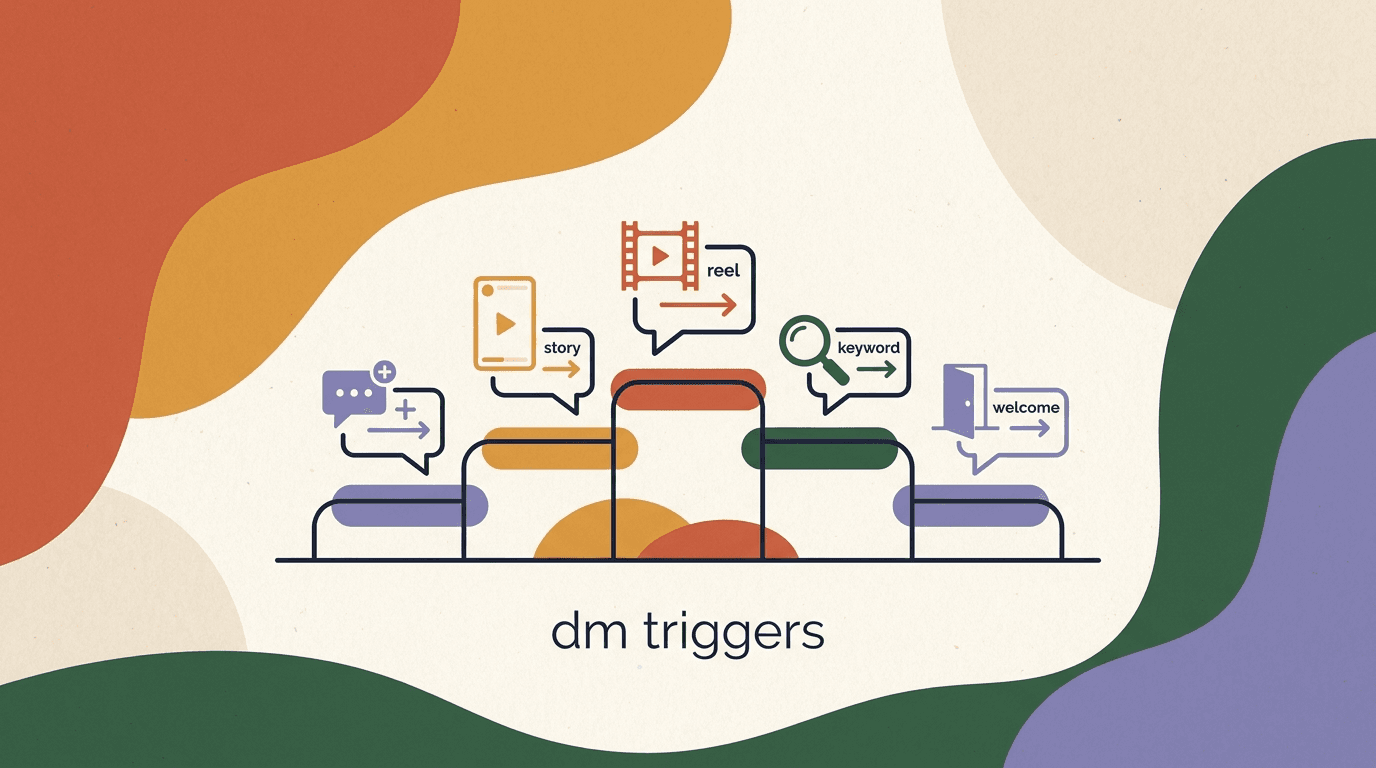
Instagram automation triggers are the events that start an automated conversation — someone comments a word, replies to a story, leaves a comment on a Reel, sends a DM, or messages you for the first time. Pick the right trigger for the right moment and your automation feels like a helpful, instant reply. Pick the wrong one and it feels like spam, or worse, it never fires at all. The trigger is the hinge the entire flow swings on, and most people give it about ten seconds of thought before moving on to the fun part: writing the message.
That order is backwards. The message matters, but the trigger decides who sees it, when they see it, and whether Instagram even allows it. A brilliant reply attached to the wrong trigger reaches the wrong people at the wrong time. A plain reply attached to the right trigger can outperform it ten to one. So this guide is a ranked rundown of the five triggers worth your attention, from the one we reach for first to the one that quietly does its job in the background — with the conditions where each shines, the conversion notes that matter, the setup steps, and the pitfalls that trip people up.
Full disclosure before we rank anything: we build KlyoChat, a tool that runs all of these triggers. We have a point of view, and you will see it near the end in one clearly marked section. The rest is meant to be useful no matter which platform you run, because the logic of triggers — what each is good at and where each breaks — is the same everywhere. The pricing and the polish differ between tools; the underlying mechanics do not.
What actually counts as an Instagram automation trigger?
Before ranking, it helps to be precise about what we mean. An Instagram automation trigger is a specific, observable event on your account that your automation tool is watching for. When the event happens, the tool starts a flow — usually a DM, sometimes a sequence of them. The trigger is the cause; the flow is the effect.
There are really only a handful of events Instagram exposes to automation tools, and the good triggers are combinations and refinements of those events. A comment is an event. A comment containing a particular word is a more specific event. A story reply is an event. An inbound DM is an event, and an inbound DM that is the very first message from a given person is a special, valuable case of that event. Everything in this ranking is built from those primitives.
Understanding the primitives matters because it tells you what is and is not possible, and it explains the rules. Instagram, through Meta's Messenger and Instagram APIs, decides which events tools can react to and under what conditions. The most important condition is the 24-hour window, which we will return to repeatedly: outside of specific exceptions, you can only send automated free-form messages within 24 hours of a person's last interaction with you. Triggers that start from a fresh interaction reset that clock; triggers that try to reach cold, dormant people run into it.
| Trigger | Underlying event | Who it reaches |
|---|---|---|
| Comment keyword | Comment on a feed post containing a set word | People engaged enough to comment a specific term |
| Story reply | A reply to one of your stories | Warm followers reacting in the moment |
| Reel comment | Comment on a Reel containing a set word | Cold + warm reach from the discovery surface |
| Keyword DM | Inbound DM containing a recognized phrase | People who messaged you with intent |
| Welcome DM | The first-ever DM from a person | Brand-new conversations only |
Triggers are platform-governed, not infinite
You cannot invent a trigger Instagram does not expose. Every tool — KlyoChat included — works within the same set of events Meta makes available, and within the same 24-hour window. If a competitor promises a trigger that ignores those rules, be skeptical: it either breaks Meta's terms or it does not do what it claims.
How did we rank these five triggers?
Ranking triggers is not the same as ranking which one to use today. The right trigger depends entirely on your goal in a given moment. So this ranking is a general-purpose default — the order in which we would reach for these triggers if we knew nothing about your specific campaign. We weighted three things: conversion quality (how warm and intent-rich the audience is), control (how predictably the trigger fires and how cleanly it filters), and durability (how well it holds up against Instagram's rules and against spam fatigue).
By that combined measure, the comment keyword trigger comes first because it scores high on all three. The welcome DM comes last not because it is bad — it is essential — but because it is narrow: it only ever runs once per person and it cannot, on its own, drive reach. In between sit story reply, Reel comment, and keyword DM, each excellent at a specific job and weaker outside it.
Read the ranking as a priority list for your attention and setup time, not as a verdict on any single trigger's worth. A mature account runs all five at once, each handling the slice of the funnel it is best suited to. The mistake is not picking the wrong one — it is using one trigger for a job it was never meant to do.
- Conversion quality: how warm and how intent-rich the triggered audience is.
- Control: how reliably it fires and how cleanly you can filter who enters.
- Durability: how well it survives Meta's rules and audience spam fatigue.
- The ranking is a default priority, not a one-and-only choice — run all five over time.
Trigger #1: Why is the comment keyword trigger the best?
The comment keyword trigger fires when someone comments a specific word — say, GUIDE or LINK or PRICE — on one of your feed posts. Your tool spots the keyword, then sends that commenter a DM. It is the highest-converting Instagram automation trigger for most accounts, and it earns the top spot by combining strong intent with tight control.
The intent is the key. A person who reads your post, sees your call to action, and types a specific word into the comment box has taken a deliberate, effortful action. They are not idly scrolling; they have raised their hand and named exactly what they want. That self-selection makes the resulting DM feel earned rather than intrusive. You are not interrupting anyone — you are responding to a request. Conversion rates on comment-keyword flows are typically the strongest of any trigger because the audience pre-qualified itself.
Control is the second reason. Because you choose the keyword and you choose the post, you decide precisely who enters the flow. A typo-tolerant keyword like GUIDE catches the people you want and ignores the rest of the comment section. You can run different keywords on different posts and route each to a different flow. And because the comment is a fresh interaction, the DM lands well inside the 24-hour window — Instagram is happy to deliver it.
There is a bonus effect worth naming. Asking people to comment a keyword also lifts the post's engagement, which can help its reach. The trigger does double duty: it starts a high-intent conversation and it feeds the algorithm the comments it likes to see. Few triggers help you twice like that.
- Pick a post and a single, obvious keywordChoose a short, easy-to-type word tied to the offer — GUIDE, LINK, START. One word beats a phrase; people fat-finger phrases.
- Write a call to action into the captionTell people exactly what to do: 'Comment GUIDE and I'll DM you the link.' Ambiguity kills trigger rates.
- Build the DM that delivers the promise immediatelyThe first message should hand over what you offered, with a one-line follow-up question to keep the conversation open.
- Add a public comment replyAuto-reply to the comment publicly ('Check your DMs!') so others see the mechanism working and copy it.
Make the keyword forgiving
Match on the keyword anywhere in the comment, case-insensitive, and tolerate punctuation. 'PRICE', 'price please', and 'Price?!' should all fire. Requiring an exact, isolated match is the single most common reason comment-keyword flows under-trigger.
Comment keyword flow in action
- Post caption
- New pricing breakdown is live. Comment PRICE and I'll send it over.
- Trigger
- Someone comments 'PRICE' (or 'price!!' or 'Price?')
- DM sent
- Here's the full breakdown 👉 [link]. Want me to flag the plan that fits your team size?
- Public reply
- Sent! Check your DMs 📩
What pitfalls hit the comment keyword trigger?
The comment keyword trigger is forgiving, but it has failure modes worth knowing before you lean on it. Almost all of them come down to one of two problems: the trigger does not fire when it should, or it fires for people you did not intend.
Under-triggering usually traces back to keyword matching that is too strict. If your tool requires an exact match, every variation — a trailing emoji, a typo, an extra word — slips through and the commenter wonders why nobody DM'd them. Over-triggering happens when your keyword is a common English word that shows up in ordinary comments. Pick LOVE as your keyword and you will DM everyone who says they love the post, including people who never wanted your link.
- Too-strict matching: exact-match-only keywords miss typos and variations, so real prospects never get the DM.
- Common-word keywords: choosing an everyday word means ordinary comments trigger the flow by accident.
- No public reply: skipping the visible 'check your DMs' reply means others do not learn the mechanic exists.
- Broken promise: if the DM does not deliver exactly what the caption offered, trust evaporates on the first send.
- Ignoring the window: the comment opens a 24-hour window — long follow-up sequences past that point need a valid message type.
Do not over-automate the comment section
Auto-DMing every commenter on every post, regardless of keyword, is the fastest way to look like spam and draw Instagram's attention. Keep the trigger keyed to a deliberate keyword and a deliberate post. Reach is not the goal here — intent is.
Trigger #2: When is the story reply trigger the right call?
The story reply trigger fires when someone replies to one of your Instagram stories. Stories are where your warmest, most habitual followers live — the people who watch every day — so a reply is a strong signal of an engaged relationship. That warmth is why the story reply trigger ranks second: the audience is small but unusually high-quality.
Story replies have a property the other triggers lack: they are conversational by nature. A person replying to a story is already in DM mode — Instagram routes story replies straight into the inbox as messages. So your automated response does not feel like a system reaction; it feels like you answering a message, because mechanically that is what it is. The transition from story to conversation is the smoothest of any trigger.
The best uses of the story reply trigger lean into that intimacy. Put an interactive sticker on a story — a poll, a question box, an emoji slider — and the replies pour in. Each one is a person volunteering attention. A flow that responds to those replies with something relevant turns a passive story view into an active, two-way thread. Because the reply is a fresh interaction, your response lands comfortably inside the 24-hour window.
The honest limitation is reach. Stories are seen mostly by existing followers, so this trigger does not grow your audience — it deepens your relationship with the audience you already have. That is exactly why it sits at number two rather than number one: phenomenal for nurturing and converting warm followers, useless for finding new ones.
- Post a story with an interactive promptUse a question sticker, poll, or a direct 'reply YES if you want this' line. Interaction stickers multiply reply volume.
- Set the trigger to catch story repliesConfigure the flow to fire on any reply, or narrow it to replies containing a word if you ran a keyword prompt.
- Respond like a person, not a robotOpen with a reaction to what they said, then move toward your offer. Story replies are intimate — match the register.
- Branch on the answer where it helpsIf you asked a yes/no question, send different follow-ups based on the reply so the conversation stays relevant.
Treat story replies as the warmest lead you'll get
Someone who replies to your story watches you regularly and chose to engage in a private channel. Do not waste that with a generic blast. The story reply trigger rewards a personal, specific response more than any other trigger on this list.
Story reply flow in action
- Story
- Question sticker: 'What's your biggest DM headache right now?'
- Trigger
- A follower taps the sticker and types a reply
- DM sent
- Oof, that one's common. I actually wrote a short fix for exactly this — want it?
- On 'yes'
- Here you go 👉 [link]. Tell me if it helps.
What pitfalls hit the story reply trigger?
The story reply trigger's weaknesses are mostly about expectation and tone. Because it is so intimate, a clumsy automation feels more jarring here than anywhere else. People expect a story reply to reach a human, so a stiff, obviously canned response can backfire harder than the same message would after a comment keyword.
There is also a volume reality. Story replies are lower in number than comments or DMs for most accounts, so this trigger will never be your highest-volume channel. Treating it like a growth engine leads to disappointment. Its value is per-reply quality, not total throughput. And reactions — the quick emoji taps on a story — are not always the same as text replies, so confirm your tool distinguishes a genuine reply from a tap.
- Robotic tone: a canned reply feels worse here because the channel is so personal.
- Low volume: do not expect comment-level numbers; story replies are quality over quantity.
- Reactions vs replies: quick emoji reactions may not trigger a text flow — verify what your tool catches.
- Over-asking: chaining too many automated follow-ups onto a warm reply burns the relationship fast.
- No human handoff: when a reply turns into a real question, the flow must hand off to a person cleanly.
Keep a human ready behind story replies
Story repliers are your most loyal audience. When the automation has done its job — delivered the link, answered the obvious question — make it easy for a real person to step in. The mobile-first inbox in KlyoChat is built for exactly this handoff, but any tool you use should let a human take over without friction.
Trigger #3: How does the Reel comment trigger scale reach?
The Reel comment trigger is the comment keyword trigger's louder cousin. It fires when someone comments a keyword on a Reel, and the reason it ranks third — just behind story reply despite reaching far more people — is a deliberate trade. It buys enormous reach at the cost of some audience warmth.
Reels are Instagram's discovery surface. A single Reel can reach people who do not follow you, have never heard of you, and stumbled onto your video in their feed. When one performs, the comment volume can dwarf anything a feed post generates. Attach a keyword trigger to a Reel that takes off and you can start thousands of conversations from one video. No other trigger on this list scales like that.
The trade is that Reel commenters are colder on average than feed commenters or story repliers. Some are devoted followers; many are first-time viewers reacting to a single video with no prior relationship. Your DM has to do more work to establish trust because it cannot assume any. The intent is real — they still typed your keyword — but the relationship is thin. So the same mechanics as the comment keyword trigger apply, with the message tuned for an audience that may be meeting you for the first time.
Mechanically it is identical to trigger #1: pick a keyword, ask for it in the caption or the video itself, deliver on the promise in the DM. The difference is scale and temperature. Treat a viral Reel's comment flow as a first impression, not a continuation, and you will convert a meaningful slice of an audience you could never have reached otherwise.
| Dimension | Feed comment keyword | Reel comment keyword |
|---|---|---|
| Typical reach | Mostly existing followers | Followers + cold discovery |
| Audience warmth | Warmer, knows you | Colder, may be first contact |
| Volume ceiling | Moderate | Very high on a viral Reel |
| Message tuning | Can assume context | Must establish trust fast |
Spoken plus on-screen plus caption
On a Reel, ask for the keyword three ways: say it out loud, put it on-screen as text, and write it in the caption. Many viewers watch muted, many skip the caption, and the keyword only works if they actually notice the instruction.
What pitfalls hit the Reel comment trigger?
The Reel comment trigger's pitfalls all stem from its strength: scale. The same volume that makes it powerful makes it conspicuous, and Instagram watches high-volume automated DM activity closely. A flow that fires thousands of identical DMs in a short window can look like exactly the kind of behavior the platform polices.
The colder audience creates a second class of pitfall. A message that works for warm feed followers — assuming they know who you are, jumping straight to the offer — can fall flat with strangers who arrived from the discovery feed. And because reach is intoxicating, it is tempting to optimize for trigger volume over conversation quality, ending up with thousands of DMs and very few real conversations.
- Looking like spam: high-volume identical DMs draw platform scrutiny — vary nothing reckless and respect rate limits.
- Warm-audience assumptions: cold Reel viewers need context your feed followers already have.
- Vanity volume: thousands of triggers mean nothing if the DM does not convert a cold audience.
- Caption-only instructions: muted, caption-skipping viewers miss a keyword that only appears in text.
- Window pressure: a wave of cold contacts all open 24-hour windows at once — plan follow-ups within compliant message types.
Respect Meta's rules at Reel scale
A viral Reel can push your DM volume up sharply and suddenly. That is precisely when Meta's automation and spam policies matter most. Keep messages genuinely useful, stay within the 24-hour window for free-form replies, and never blast a follow-up to people who never responded. Scale is a privilege the platform can revoke.
Trigger #4: Why is the keyword DM trigger so underused?
The keyword DM trigger fires when someone sends you a direct message containing a recognized phrase — not a comment, an actual inbound DM. It ranks fourth, and it is the most underused trigger on this list, because most people forget that their inbox is already full of intent waiting to be routed.
Think about who sends you a DM unprompted. They are not reacting to a campaign you launched; they sought you out and typed a question. 'Do you ship to Canada?' 'How much is the course?' 'Are you taking clients?' Every one of those is a high-intent inbound that, on most accounts, sits unanswered for hours. The keyword DM trigger reads those messages, recognizes the intent behind common phrases, and responds instantly with the right answer.
The reason it ranks below the comment and Reel triggers is reach, not quality — the quality is excellent. A keyword DM trigger cannot generate new conversations; it can only respond to ones people start. It is a reactive trigger, not a proactive one. But for the conversations it does catch, the intent is often higher than anything a comment generates, because the person bothered to open a DM and write a real question rather than dropping a one-word comment.
The best implementations build a small library of recognized intents — pricing, availability, shipping, hours, how-to-buy — and an answer for each. When a DM contains a matching phrase, the right answer fires in seconds. Anything the library does not recognize routes to a human. The result is a responsive inbox that answers the predictable questions instantly and reserves human time for the ones that actually need it.
- List your top recurring DM questionsLook at your inbox. The same five to ten questions repeat constantly — pricing, availability, shipping, hours, returns. Those are your intents.
- Map phrases to each intentFor 'pricing', match 'price', 'how much', 'cost', 'rates'. People phrase the same question many ways — capture the variants.
- Write a clear answer per intentEach recognized phrase gets a concise, complete reply. Answer the question and offer the obvious next step.
- Route the unknown to a humanIf a DM matches nothing, hand it to a person rather than guessing. A wrong automated answer is worse than a slightly slower human one.
Answer the question, then advance it
A keyword DM reply should do two things: fully answer what was asked, and offer the next step. 'Yes, we ship to Canada' is fine; 'Yes, we ship to Canada — want the link to order?' converts. The person already showed intent; help them act on it.
Keyword DM trigger in action
- Inbound DM
- hey do you have any spots left this month?
- Matched intent
- availability ('spots', 'open', 'taking clients', 'availability')
- Auto-reply
- Yes — two spots left for this month. Want me to send the booking link?
- Unmatched DM
- Routed to a human in the shared inbox
What pitfalls hit the keyword DM trigger?
The keyword DM trigger's risks come from misreading intent. Because it acts on free-form messages people write themselves, the phrasing is wildly varied, and a phrase-matching system can grab the wrong intent or miss one entirely. Confidence matters: a confidently wrong automated answer to a paying customer's question damages trust fast.
The other pitfall is scope creep. It is tempting to try to automate answers to every conceivable question, but the long tail of inbound DMs is genuinely unpredictable. The trigger earns its keep on the common, repetitive questions; pushing it to handle rare or nuanced ones produces awkward mismatches. Knowing what to leave for a human is as important as knowing what to automate.
- Wrong-intent matches: overlapping phrases can fire the wrong answer — keep intents distinct and test them.
- Over-reach: automating the rare long-tail questions produces mismatches; automate the common ones only.
- No fallback: every unmatched DM needs a clean route to a human, not a generic 'I didn't understand'.
- Stale answers: if pricing or availability changes, the automated answers must change with it.
- Losing the personal touch: high-stakes inquiries deserve a human; do not let automation gate every conversation.
This is where an AI agent earns its place
Rigid keyword matching struggles with the variety of real inbound DMs. An AI agent that understands intent — included on KlyoChat plans — handles phrasing it has never seen exactly, while still handing off anything outside its knowledge to a person. For the keyword DM trigger specifically, intent understanding beats brittle phrase lists.
Trigger #5: Does the welcome DM trigger still matter?
The welcome DM trigger fires once per person: the very first time someone sends your account a DM, before any other automation has a chance to run. It ranks fifth not because it is weak but because it is narrow — it cannot drive reach, it cannot be reused on the same person, and on its own it does not convert anyone. What it does is set the tone for every conversation that follows, which is quietly more important than its ranking suggests.
A first impression in the DMs is exactly that: a first impression. The welcome DM is your chance to greet a new conversation, set expectations, and route the person toward what they came for. Done well, it makes your account feel responsive and organized from the very first message. Done poorly — or skipped — and new contacts hit silence, which is the worst possible start.
The most effective welcome DMs do not try to sell. They orient. A short greeting, a sentence about what you can help with, and a simple menu of options ('Are you here about pricing, support, or something else?') turns an undifferentiated new contact into a routed one. The person self-selects, and the rest of your automation — or a human — picks up from there with context.
The reason it sits last is that it is structural, not promotional. It does not create demand; it handles demand that already arrived. Every account should have one, but no account should expect it to grow the business by itself. Think of it as the front desk: essential, always on, and never the reason someone walked in.
- Detect the first-ever messageConfigure the trigger to fire only on a person's first DM, so returning contacts are not greeted as strangers every time.
- Greet and set expectationsA short, warm opener that says who you are and what you help with. Keep it to a sentence or two.
- Offer a simple menu of pathsGive two to four clear options so the contact can self-route. Fewer choices convert better than a long list.
- Branch into the right flow or humanEach option leads somewhere useful — an answer, a link, or a handoff to a person for anything complex.
Fire it once, not on every message
The welcome DM should greet a person the first time only. Nothing feels more robotic than being welcomed as a new contact on your fifth conversation. Make sure your tool tracks whether someone has messaged before and reserves the welcome for genuinely new contacts.
Welcome DM trigger in action
- Event
- A new person sends their first-ever DM to your account
- Welcome DM
- Hey, thanks for reaching out 👋 I can help with pricing, your order, or general questions — which one?
- On 'pricing'
- Routes into the pricing flow with the link and a follow-up question
- On 'order'
- Routes to a human in the shared inbox for account-specific help
What pitfalls hit the welcome DM trigger?
The welcome DM's pitfalls are subtle precisely because the trigger is simple. The most common one is repetition: a welcome that fires every time a person messages, rather than only the first time, makes your account feel forgetful and impersonal. Returning contacts should be recognized, not re-introduced.
The second pitfall is over-loading the welcome. Because it is the first message, there is a temptation to cram everything into it — the pitch, the links, the offer, the menu. That overwhelms a new contact. The welcome's job is to orient and route, not to close. Save the substance for the flow the person selects.
- Repeated welcomes: greeting returning contacts as new people feels robotic and forgetful.
- Overloaded message: cramming pitch, links, and menu into one welcome overwhelms a fresh contact.
- No routing: a welcome that greets but offers no next step leaves the contact stranded.
- Selling too soon: the first message is for orientation, not a hard pitch.
- Silent fallback: if the contact picks an option you did not plan for, the flow must still respond gracefully.
The welcome sets the standard for everything after
Every other trigger benefits from a good welcome, because it establishes that your account replies quickly and helpfully. A weak or missing welcome undercuts even your best comment-keyword flow. It ranks last in reach but it underwrites the whole system's credibility.
How do the five triggers fit together in one funnel?
The biggest mistake with Instagram automation triggers is treating them as competitors when they are collaborators. A complete account runs all five at once, each covering the part of the funnel it is built for. Ranking them tells you where to start; combining them tells you how to win.
Picture the journey. A Reel reaches a cold audience and the Reel comment trigger captures the ones who type your keyword. A feed post serves your warmer followers, where the comment keyword trigger converts high-intent commenters. Stories deepen the relationship with your most loyal watchers through the story reply trigger. Meanwhile, the keyword DM trigger handles everyone who arrives with a question on their own, and the welcome DM trigger makes sure no first conversation ever hits silence. Each trigger feeds a different slice of the same machine.
The triggers also compound. Someone discovers you through a Reel, gets a useful DM, starts following you, watches your stories, replies to one a week later, and eventually sends a direct question. Across that arc they pass through four of the five triggers, each one warming them a little more. No single trigger did that — the system did.
| Funnel stage | Primary trigger | What it does |
|---|---|---|
| Discovery (cold) | Reel comment | Captures intent from new audiences at scale |
| Consideration (warm) | Comment keyword | Converts high-intent engaged followers |
| Nurture (loyal) | Story reply | Deepens the relationship with daily watchers |
| Inbound intent | Keyword DM | Answers self-started questions instantly |
| Every first contact | Welcome DM | Sets the tone and routes new conversations |
Start with one, then layer the rest
Do not try to launch all five triggers on day one. Start with the comment keyword trigger, get it converting, then add the welcome DM so no first contact is dropped. Layer story reply, Reel comment, and keyword DM as you grow. A working one beats five half-built ones.
How does the 24-hour window change trigger strategy?
Every trigger on this list lives inside Meta's 24-hour messaging window, and understanding it changes how you design flows. The rule, in plain terms: once a person interacts with you — comments, replies, DMs — you can send them free-form automated messages for 24 hours. After that window closes, you cannot send arbitrary follow-ups; you are limited to specific allowed message types under Meta's rules.
This is why fresh-interaction triggers are so valuable. A comment keyword, a story reply, a Reel comment, an inbound DM — each one opens or resets a 24-hour window, which means your immediate automated response is always allowed. The triggers that convert best are exactly the ones that ride a fresh interaction. That is not a coincidence; it is the platform rewarding genuine, recent engagement.
The window also disciplines your follow-up design. A long, multi-day automated sequence sent to people who never replied is precisely what the window is designed to prevent, and trying to circumvent it is how accounts get restricted. Build flows that do their work inside the window — deliver the link, answer the question, advance the conversation — and let the person's next reply reopen the window naturally if more is needed. Work with the window, not around it.
- Fresh-interaction triggers (comment, story reply, Reel comment, DM) open a 24-hour window for free-form replies.
- Inside the window, automated responses are allowed; outside it, you are limited to Meta's approved message types.
- Design flows to do their job within 24 hours rather than chasing dormant contacts with long sequences.
- Let a person's next reply reopen the window naturally instead of trying to bypass the rule.
The window is not optional
No tool can lift Meta's 24-hour window — it is enforced at the platform level. Any service claiming to send unrestricted automated follow-ups to cold contacts is either misdescribing what it does or risking your account. Respect the window and your automation stays durable.
Which trigger should you set up first?
If you can only build one trigger today, build the comment keyword trigger. It scores highest on conversion, control, and durability, it is the easiest to attach to content you are already posting, and it produces a visible result fast: comment, DM, conversion, repeat. Nothing else gives you a clearer signal that automation is working.
Once that is live and converting, add the welcome DM trigger so every new conversation — from any source — gets a proper greeting and a route. Those two together cover the most important cases: high-intent commenters and brand-new contacts. With both running, you have a foundation that handles the bulk of what a small account needs.
From there, let your content tell you what to add next. If Reels are your reach engine, the Reel comment trigger is the obvious extension. If your stories drive engagement, add the story reply trigger. If your inbox fills with repetitive questions, the keyword DM trigger pays for itself immediately. The ranking gives you the default order; your own analytics give you the real one.
- Launch the comment keyword triggerPick one offer, one keyword, one post. Get the comment-to-DM loop converting before you build anything else.
- Add the welcome DM triggerMake sure no first-time contact hits silence. Greet, orient, and route every new conversation.
- Extend toward your strongest contentAdd the Reel comment trigger if Reels drive reach, or the story reply trigger if stories drive engagement.
- Close the loop with the keyword DM triggerAutomate answers to your most repetitive inbound questions, routing anything unfamiliar to a human.
Measure before you expand
Each trigger you add is another thing to maintain. Confirm one is converting before layering the next. A single well-tuned comment keyword trigger outperforms five neglected ones, and it keeps your account simple enough to actually improve.
How does KlyoChat run all five triggers?
We built KlyoChat to run every trigger in this ranking from one place, which is the honest reason we can write about them with this much specificity — we work with them daily. If you have read this far and want to put the ranking into practice, here is how it maps to the product, told straight, including where it does not fit.
KlyoChat is an AI-native, mobile-first unified inbox covering Facebook, Instagram, Telegram, WhatsApp, TikTok, and X. All five Instagram triggers are first-class: comment-to-DM with keyword matching for both feed posts and Reels, story-reply triggers, keyword DM triggers, and welcome/first-DM triggers. You build the flows behind them with a no-code editor, and the keyword DM trigger can be backed by a real AI agent that understands intent rather than matching rigid phrases. AI agents are included — not a separate add-on — and analytics show you which triggers actually convert.
The mobile-first part matters for the story reply and welcome triggers especially, because those are the moments a human most often needs to step in. KlyoChat lets you edit flows and take over conversations from your phone, so the handoff from automation to person is clean wherever you are. That is the gap a lot of tools leave open, and it is the one that hurts most on your warmest contacts.
- All five triggers run from one inbox across six platforms — Instagram included.
- No-code flows behind every trigger; AI agents included for intent-based keyword DM handling.
- Mobile-first means the human handoff on warm triggers works from your phone.
- Pricing is flat: Basic $19, Pro $49 ($39 billed yearly), Business $129 — every plan starts with a 7-day trial, no card.
- Honest limits: KlyoChat has no native SMS or email, and it is a newer tool with a smaller community than the incumbents. If those matter to you, weigh them.
| Trigger | In KlyoChat | Notes |
|---|---|---|
| Comment keyword | Feed comment-to-DM with forgiving matching | Public reply + DM in one flow |
| Story reply | Story-reply trigger with clean human handoff | Built for the mobile-first takeover moment |
| Reel comment | Reel comment-to-DM at scale | Same keyword engine, tuned for cold reach |
| Keyword DM | Phrase match or AI-agent intent | AI agents included, not an add-on |
| Welcome DM | First-DM detection and routing | Fires once per new contact |
Where KlyoChat is not the answer
If your strategy depends on native SMS or email in the same tool, KlyoChat does not do those — factor it in. And as a newer product, the community and template library are smaller than the long-established players. We would rather you know that up front than discover it after switching. Every trigger here still obeys Meta's rules and the 24-hour window on KlyoChat, same as anywhere.
The ranking holds up as a default: comment keyword first for its blend of intent and control, story reply second for warmth, Reel comment third for reach, keyword DM fourth for routing inbound intent, and welcome DM fifth for setting the tone of every conversation. But the real lesson is that Instagram automation triggers are not a contest. They are a set of tools, each sharp at one job, and the accounts that win run all five — each handling the slice of the funnel it was built for.
Start with the comment keyword trigger, get it converting, add the welcome DM so nothing slips through, then extend toward whatever content drives your reach. Respect the 24-hour window and Meta's rules and your automation stays durable instead of fragile. For the full mechanics of each trigger, see our broader Instagram DM automation guide, the step-by-step keyword DM trigger tutorial, and our deeper look at Reels comment automation — and when you are ready to build, the flows, templates, and pricing are linked above.